The new Excel reports in Dynamics GP 10 are really pretty cool and you don't need MOSS 2007 to play with them. You can use a network share to let your organization do a little Excel reporting.
To setup the default reports you need to do 2 things, deploy the connector and deploy the reports. Here's how:
In GP 10 pick Microsoft Dynamics GP-Tools-Setup-System-Reporting Tools Setup. Enter the system password if required.
Pick the Data Connections Tab
In the System Level Data connections box enter a shared network location to deploy the connectors to.
Do the same thing for the User Level Data connections. This can be a local directory.
Check Enable Data Connection Deployment. Check Deploy Data Connections for all existing companies if you want to run Excel reports off all your companies. Otherwise, when you deploy, you'll have to pick a company.
Click Run Deployment 
Print or Cancel any reports and move to the Reports Library Tab.
Fill out the same type of information, Network location to deploy shared reports, local location for user reports, check the enable box and if you want to deploy for all companies, check the Deploy box.
Click the Run Deployment button. Print or cancel any reports. 
You're done, now what?
You can navigate to the shared location from the Reports Library Tab and open one of the Excel reports. Even better from within Dynamics GP, go to the Navigation Pane on the lower left and pick Administration or the Administration tab. Click on Other Reports and wait for them to load. 
Pick a report and double click it. The report opens nicely (and quickly in Excel). You may need to enable data connections. If a box pops up, enable data connections and go on.
In Excel 2007 the report shades every other row and provides filter handles on each column.
That's enough to let you play with it a little. I'll have more on GP 10's Excel reports and the cool things you can do with the connectors later.
Jan 5, 2010
Excel Reports in Dynamics GP 10


Sep 26, 2009
Microsoft Dynamics GP Pakistan
Dynamics GP in Pakistan is getting popular day by day, one of the core reason for this is due to high adaptability and ease of use. Many of the entrepreneurs are focused on getting the following done as soon as possible;
- One source of Truth
- Integrated Solution
- Flexible
- Best practice implementation
We have total of 100 plus Dynamics customers in Pakistan
Any customer looking for free initial level support can contact support@m-consultants.com
Nov 7, 2008
The Microsoft Dynamics GP Demo Site
The new Microsoft Dynamics GP Demo Site is so cool, you just got to see it. Probably the coolest thing you will see all year!!
And, it goes beyond just cool, there is a huge value:
· Partners can use it with prospect and existing customers.
· People can download parts of it to display on their websites or use in presentations.
· Businesses interested in becoming a partner will get value from it.
· Anyone needing an overview of Dynamics GP, should see this.
The Microsoft Dynamics GP Demo Site
Please take a look at the site today and evangelize it.
Apr 25, 2008
GP update from Partner Source - Security Planning for GP
Dear All,
Please see the attached “Planning for Security” for Dynamics GP, please read it carefully and you will understand security implications in GP.
Warm regards,
Usman Manzoor
Manager Projects, North
Feb 2, 2008
Jan 4, 2008
An Introduction to Microsoft Dynamics GP 10.0 Workflow
Slide1
Slide2
Slide3
Slide5
Slide6
Slide7
Slide8
Slide9
Sep 15, 2007
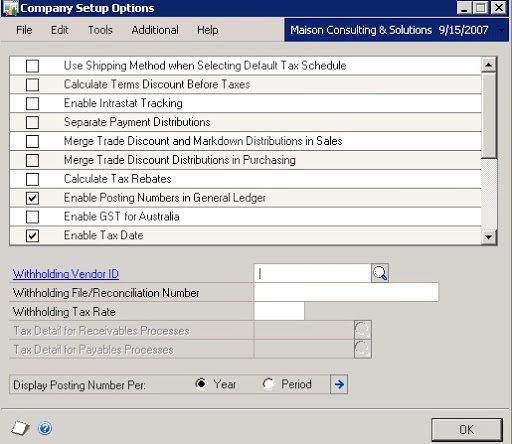
Company Setup in GP 10.0
Explaining GP 10 Company Setup Window
|
|
| Use Shipping Method When Selecting Default Tax Schedule | During Tax calculation if it is required to have multiple taxes for different states, this option is very helpful. e.g. if shipment is for CA, it will deduct CA state Tax, if it is for NY, it will deduct NY Tax |
| Calculate Terms Discount Before Taxes | If taxes doesn't support Term Discounts, Amount to be calculated on Total and not on discounted amount |
| enable Intrastat Tracking | If wants to track Intrastat enable this |
| Separate Payment Distributions | if GL is required to keep track of transactions for each module entry, mark this option for payment GL accounts to keep additional record |
| Merge Trade Discount and Markdown Distributions in Sales | If you don't mark this option, the distributions that are of the same type with the same account number will be combined. (Suggested to keep it un checked for Pakistan) |
| Merge Trade Discount Distributions in Purchasing | If this option is not marked, the trade discounts and markdown distributions will e separated from the sales Distribution |
| Calculate Tax Rebates | Mark This option to allow correcting tax amounts for a transaction with a terms discount |
| Enable Posting Numbers in General Ledger | Use this option if you want solid numbering of Transactions, without gaps, solid numbering is a legal requirements in few countries |
| Enable GST for Australia | Enable GST for Australia |
| Enable Tax Date | If tax date is different from the document date, you can check this option and a tax date field will be available on all control documents |
| Enable Reverse Charge Taxes | Helpful for negative taxation, like withholding tax |
| Calculate Taxes in General Ledger | option available if paying without BR module and wants tax calculation in GL |
| Allow Summary-Level Tax Edits | if editing allowed in summary windows, check this option |
| Require Tax Details totals to Match the Pre-Tax Amount | If proposed and actual is same mark this |
| Specify Tax Details for Automatic Tax Calculation | if multiple taxes are assigned, you may select which tax to be activated |
| Enable EU Transaction Tracking | for Enabling EU Transactions |
| Enable DDR and European Electronic Funds Transfer | for EU |
| Enable Canadian Tax Detail | for Canada |
Withholding Vendor ID:
specify which vendor to Act as Tax Authority
Withholding File/Reconciliation Number
Withholding Tax Rate
Default 3.5% in case of Pakistan
Display Posting Number Per: Year or Period
Subscribe To


 Posts
All Comments
Posts
All Comments